Designing a flexible circuit that can bend without compromising reliability can be challenging, especially in compact or moving applications. An incorrect flexible (flex) PCB bend radius can place excessive mechanical stress on the circuit, potentially leading to cracked copper, damaged traces, or premature failure. That is why determining the right bend radius is essential for maintaining electrical and mechanical reliability throughout assembly and operation. The required value varies based on factors such as circuit thickness, layer count, copper configuration, materials, and whether the circuit is bent once or repeatedly.
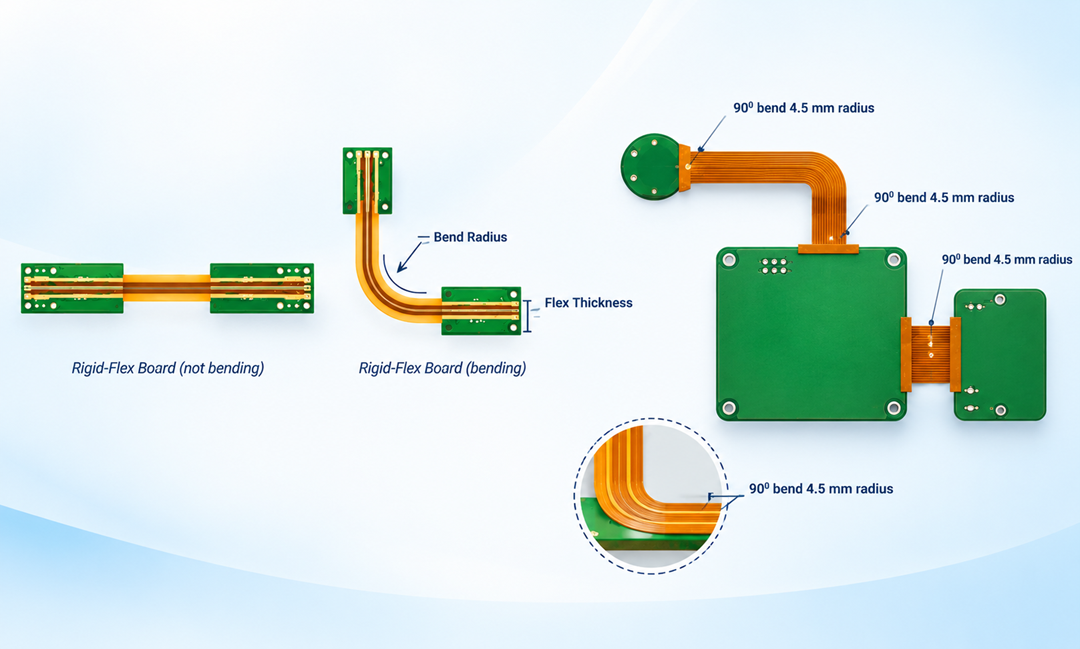
Understanding these factors early in the design process can help avoid costly design changes and reliability issues later. This post explains flex PCB bend radius, its significance, the factors that influence it, and how to determine a suitable value for your application.
What Is Flex PCB Bend Radius
Flexible PCB bend radius refers to the radius of the curve formed when a flexible circuit is bent. A larger radius produces a gentler curve, while a smaller radius creates greater mechanical strain. During bending, the outer layers experience tension and the inner layers experience compression. Excessive strain can damage copper, cause delamination, and shorten the circuit’s service life.
Flex PCB Bend Radius Calculation
Flex PCB minimum bend radius can be estimated by multiplying the total finished thickness of the flexible section by an appropriate application multiplier specified in the IPC-2223 Standard.
While these may be used as preliminary design guidelines, actual allowable bend radius depends on the flex construction, copper type, layer arrangement, materials, bend direction, and expected number of flex cycles. Hence, it is essential to confirm the final value against the applicable design standard and PCB manufacturer’s recommendations.
Here is the formula:
Minimum Bend Radius (R) = Total Flex Thickness (t) * Multiplier (N)
Where:
- Minimum Bend Radius (R): The smallest allowable radius specified for the flex circuit during bending, measured according to the convention used by the applicable design guideline or manufacturer.
- Total Flex Thickness (t): The combined finished thickness of the materials forming the flexible section within the bend area, including copper foil, dielectric layers, adhesives, and coverlay.
- Application Multiplier (N): A factor selected according to the flex construction, number of conductive layers, and whether the circuit is intended for static or dynamic bending.
Recommended Bend-Radius Multipliers
The appropriate multiplier varies according to the intended mechanical application and layer construction.
| Application | Flex Construction | Multiplier (N) |
| Static — Bend-to-fit / single installation bend | Single-layer | 6× to 10× thickness |
| Static — Bend-to-fit / single installation bend | Multilayer (2+ layers) | 12× to 20× thickness |
| Dynamic — Repeated movement or continuous flexing | Single-layer | 100× thickness |
| Dynamic — Repeated movement or continuous flexing | Double-/multilayer | 100× to 150×+ thickness |
Step-by-Step Example Calculation
Consider a double-layer flex PCB intended for a static bend-to-fit application.
- Assume the finished flexible-pcb section thickness is: 0.2mm.
- For a multilayer static construction, select N=12.
- Compute Radius (R): 0.2mm × 12 = 2.4mm
The minimum inner bend radius for this circuit is 2.4mm.
How to Choose the Right Flex PCB Bend Radius
Here are some key steps to establish a suitable bend radius for your application.
- Identify the bending requirement: Determine how the flex circuit will move within the final assembly. Classify the application according to its expected bending behavior and operating conditions, then select a bend-radius approach that matches the circuit’s intended mechanical movement.
- Determine the finished flex thickness: Obtain the finished thickness of the flexible section from the PCB stack-up or fabrication documentation. Use the local finished thickness of the actual flex construction in the bending region, rather than relying only on the nominal thickness of the overall PCB to ensure the calculation represents the assembled flex construction accurately. This is because the thickness throughout the board may not be uniform.
- Select the appropriate multiplier: Choose the bend-radius multiplier according to the identified application and flex construction. Use the applicable design guideline or manufacturer recommendation rather than selecting a multiplier arbitrarily, particularly when the circuit will experience repeated mechanical movement.
- Calculate the minimum bend radius: Apply the selected multiplier to the finished flex thickness to determine the minimum recommended radius. Perform the calculation using consistent units and document the resulting value as a mechanical requirement for the flex circuit design.
- Incorporate the radius into the mechanical design: Apply the calculated radius when defining the flex path, enclosure geometry, and installation space. Ensure the physical assembly provides sufficient clearance to maintain the specified radius throughout installation, operation, and any expected movement.
- Verify the final design: Review the selected radius against the manufacturer’s recommendations and the completed mechanical design. Confirm that assembly conditions will not force the flex below the specified radius before releasing the design for fabrication.
Common Flexible PCB Bend Radius Problems and Their Solutions
Poor bend-radius design can create mechanical failures that affect both assembly and long-term operation. The following problems highlight common failure mechanisms and practical approaches for improving flex PCB reliability.
- Copper Cracking: Tight bends can place excessive mechanical strain on copper conductors, increasing the risk of cracks and electrical discontinuities. Review the bend geometry, minimize unnecessary thickness in the flexible region, and avoid placing vulnerable conductor features where bending creates concentrated mechanical stress.
- Delamination or Coverlay Damage: Repeated or excessive bending can damage dielectric interfaces, coverlay, or bonded layers when the construction cannot accommodate the applied mechanical stress. Work with the fabricator to review the material system, bonding construction, and transition geometry before finalizing the design.
- Failure During Repeated Movement: A flex circuit may perform correctly during assembly but deteriorate after repeated movement because of accumulated mechanical fatigue. For applications involving continuous motion, evaluate the expected operating cycle and validate the design through appropriate mechanical testing before production release.
- Feature-Related Stress: Discontinuities such as vias, solder joints, abrupt conductor transitions, and stiffener edges can concentrate mechanical stress within the flex circuit. Position these features outside the primary bending region whenever possible and provide smooth transitions between rigid and flexible sections.
- Insufficient Design Margin: Designing close to the minimum acceptable radius leaves limited tolerance for assembly variation, dimensional changes, and actual operating movement. Where the mechanical envelope permits, increase the working radius beyond the calculated minimum to provide greater tolerance and improve overall design robustness.
Improve Flex PCB Reliability with the Right Bend Design
If your application requires reliable flex PCB performance under bending or repeated movement, work with an experienced PCB manufacturing partner. Rigiflex Technology delivers custom flex and rigid-flex PCB solutions with technical support for bend-radius selection, design optimization, and manufacturability. Contact their experts today to discuss your project and build a more reliable flex circuit.
Frequently Asked Questions (FAQs)
Can vias be placed directly in the bend area of a flexible PCB?
It is generally better to avoid vias in regions that undergo repeated bending, as they can create localized mechanical stress. Place them outside the primary bend zone whenever the design allows.
How does a copper pour affect flexible PCB bending performance?
Large copper areas can make a flex section less compliant and create uneven stiffness across the bend. Use copper balancing and suitable patterning to maintain more uniform flexibility.
Can adhesive thickness change the effective bend radius of a flex PCB?
Yes. Adhesives and coverlay materials contribute to the finished flex thickness and therefore influence its mechanical behavior. The complete manufactured thickness should be considered rather than the copper and dielectric layers alone.
What happens if a Flex PCB is bent beyond its recommended radius?
Excessive bending can cause copper cracking, delamination, coverlay damage, or permanent deformation. The damage may initially appear only as intermittent electrical failures before becoming a complete open circuit.
Does the direction of bending matter for a flexible PCB?
Yes. Flex circuits are designed with specific bend orientations, and bending in an unintended direction can place different layers under greater mechanical stress. The final assembly should therefore account for the intended bend axis.
Can component placement affect the bending performance of a Flex PCB?
Yes. Components, solder joints, stiffeners, and other rigid features can create stress concentrations near the bend transition. Keeping these features outside the active bending area generally improves reliability.
Why can a Flex PCB fail even when its bend radius meets the calculated value?
A calculated radius does not account for every assembly and operating condition. Local copper features, sharp transitions, repeated flexing, temperature changes, or installation forces can introduce additional stresses.
Is bend radius important during flex PCB assembly as well as operation?
Yes. Temporary bending during assembly, installation, or connector mating can exceed the conditions expected during normal operation. Assembly processes should therefore define their own allowable flex limits.